AVAashima Vinayak
Skip to content

Case study / 01

Guest ServicesPlatform

One workspace for the moments that cannot wait.

A unified operational platform that brings together box office, customer support and venue operations so teams can resolve issues, move faster and never lose context.

Role
Lead Product Designer
Product
Guest Services Platform
Surfaces
Web Application
Timeline
6 months
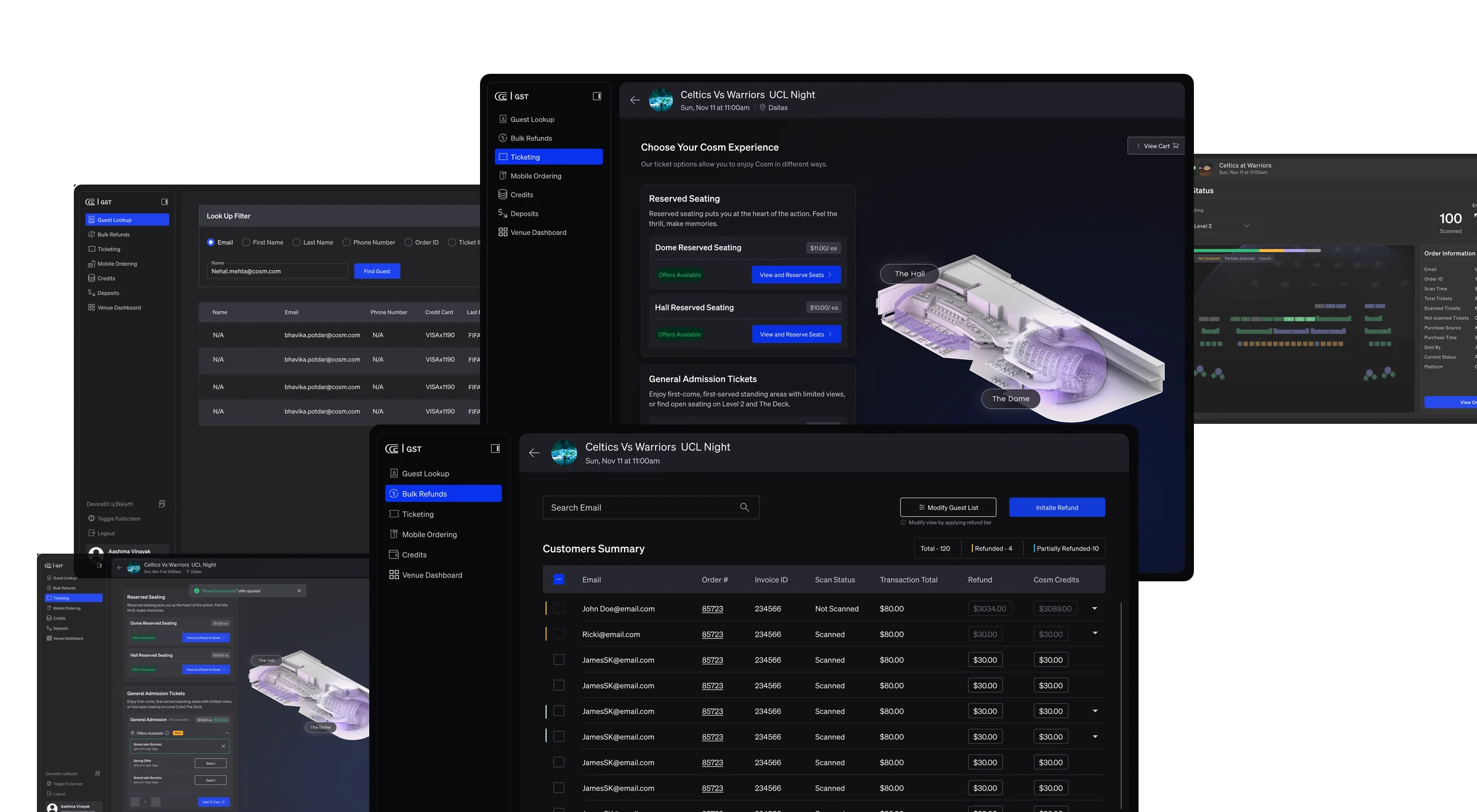
Guest Services platform interfaces for ticketing, guest lookup, refunds and venue operations

01

One workspace for the moments
that cannot wait

Guest Services is the operational workspace Cosm venue teams work in before, during and after an event. It brought fragmented operational actions into one shared system for Box Office, Customer Support and Venue Operations.

The design challenge was not to make an operations tool look better. It was to make one product serve three roles with different permissions, different pressures and a shared need for the same guest record — without becoming three products wearing one shell.

02

The operational gap

Before the platform, a single guest issue was assembled by hand from several systems that did not know about each other.

  • Context switching

    Resolving one guest issue meant moving between separate tools, each holding a different fragment of the same order.

  • Manual handoffs

    Work passed between Box Office, Support and Venue Operations by message and memory rather than by shared state.

  • Inconsistent resolution

    The same issue was resolved differently depending on who picked it up and which tool they reached for first.

  • Information loss

    What had already been tried, refunded or promised did not reliably travel with the guest between teams.

Before

Fragmented tools, separate teams, manual handoffs

  • Box Office
  • Customer Support
  • Venue Operations
  • Ticketing tool
  • Refund tool
  • Scan / access system
  • Payments
  • Spreadsheets & notes
  • Email threads

After

One shared platform connecting roles, guest context and workflows

  • Box Office
  • Customer Support
  • Venue Operations

Guest Services Platform

  • Guest Lookup
  • Refunds & Credits
  • Ticketing
  • Non-Ticket Items
  • Venue Dashboard

03

Three roles,
one source of truth

The same record, read three different ways. Each role needs a different part of it first — and none of them can afford to wait for another team to look something up.

  • Box Office

    Sell, reissue and correct at the window

    Works in front of a waiting guest. Needs the order, the seat inventory and the payment adjustment in one place, with holds and offers visible before committing.

    Ticketing and inventory

  • Customer Support

    Resolve with the full history

    Picks up an issue mid-story. Needs what has already been tried — refunds issued, credits applied, seats released — attributed and time-stamped, so nothing is repeated or contradicted.

    Guest Lookup and refund history

  • Venue Operations

    Read the room while it happens

    Judges an event in progress. Needs scan status, sold and capacity totals at a glance, and the ability to open a single order without leaving that view.

    Venue Dashboard

04

One connected
operational journey

Five capabilities in the order an issue actually travels — find the guest, put it right, reissue, account for what is not a ticket, and watch the room while it happens.

01

Guest Lookup

Operational need
A guest offers whatever detail they have — a name, an email, a card, an order number.
Key decision
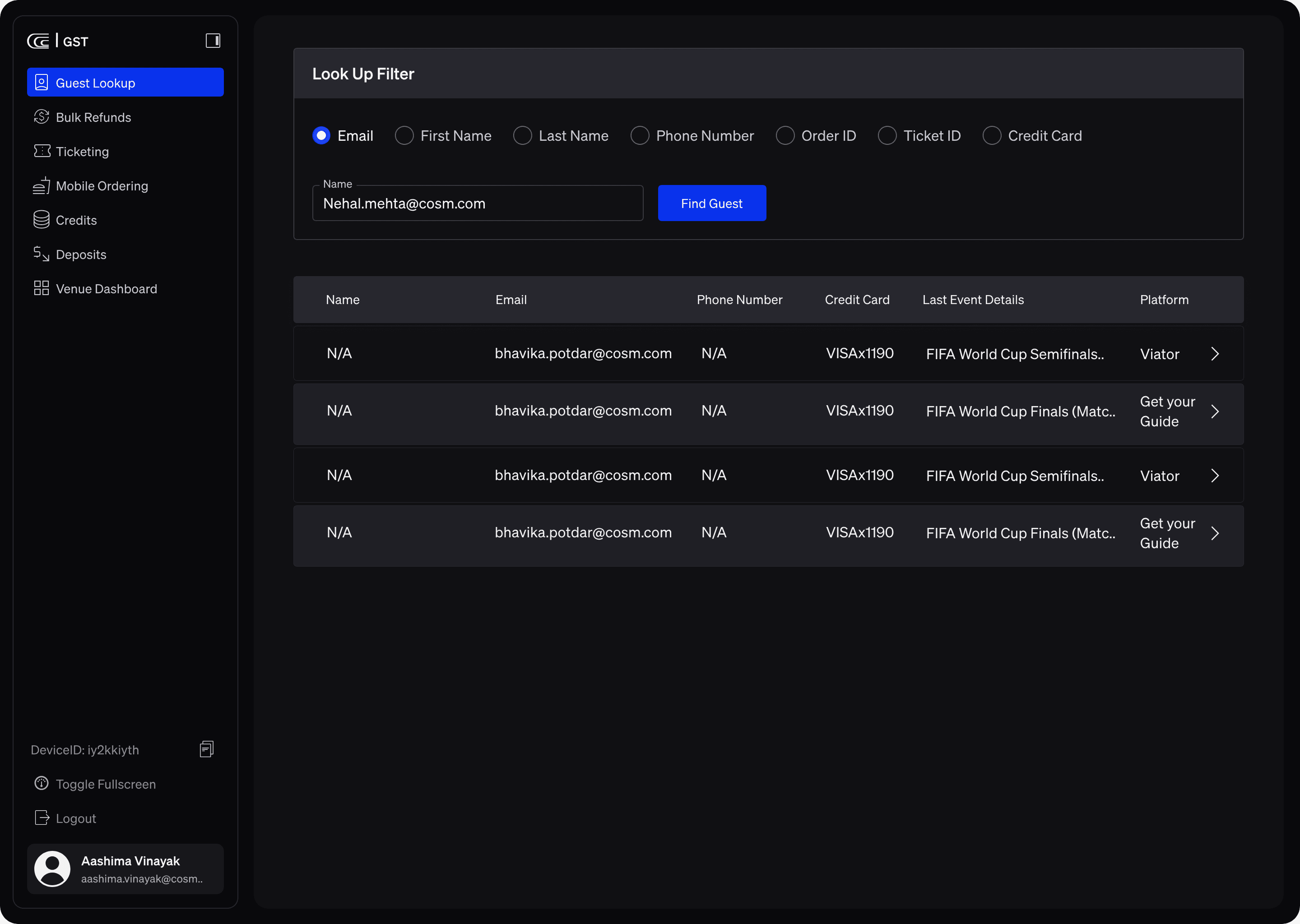
Every identifier is a first-class entry point rather than one canonical search with fallbacks buried behind it, so the search matches how the conversation actually starts.
Why it holds
The record opens once and stays open. Nothing downstream asks the guest to repeat themselves.
Guest Lookup in the Guest Services Terminal: search filters across name, email, phone, order number and card, with a results table of matching guest records.

02

Refunds & Credits

Operational need
Money movement under time pressure, with approval limits and an audit obligation.
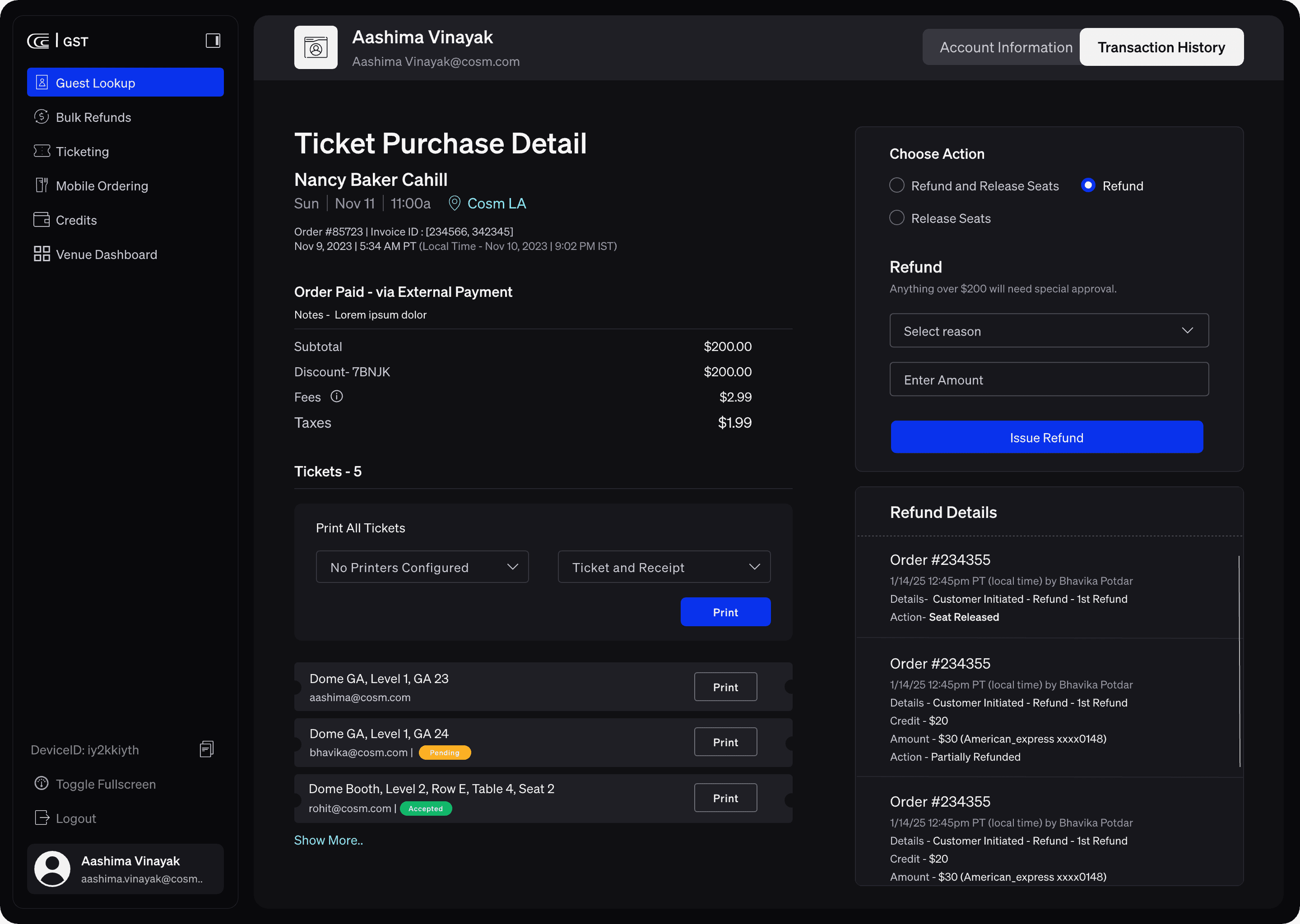
Key decision
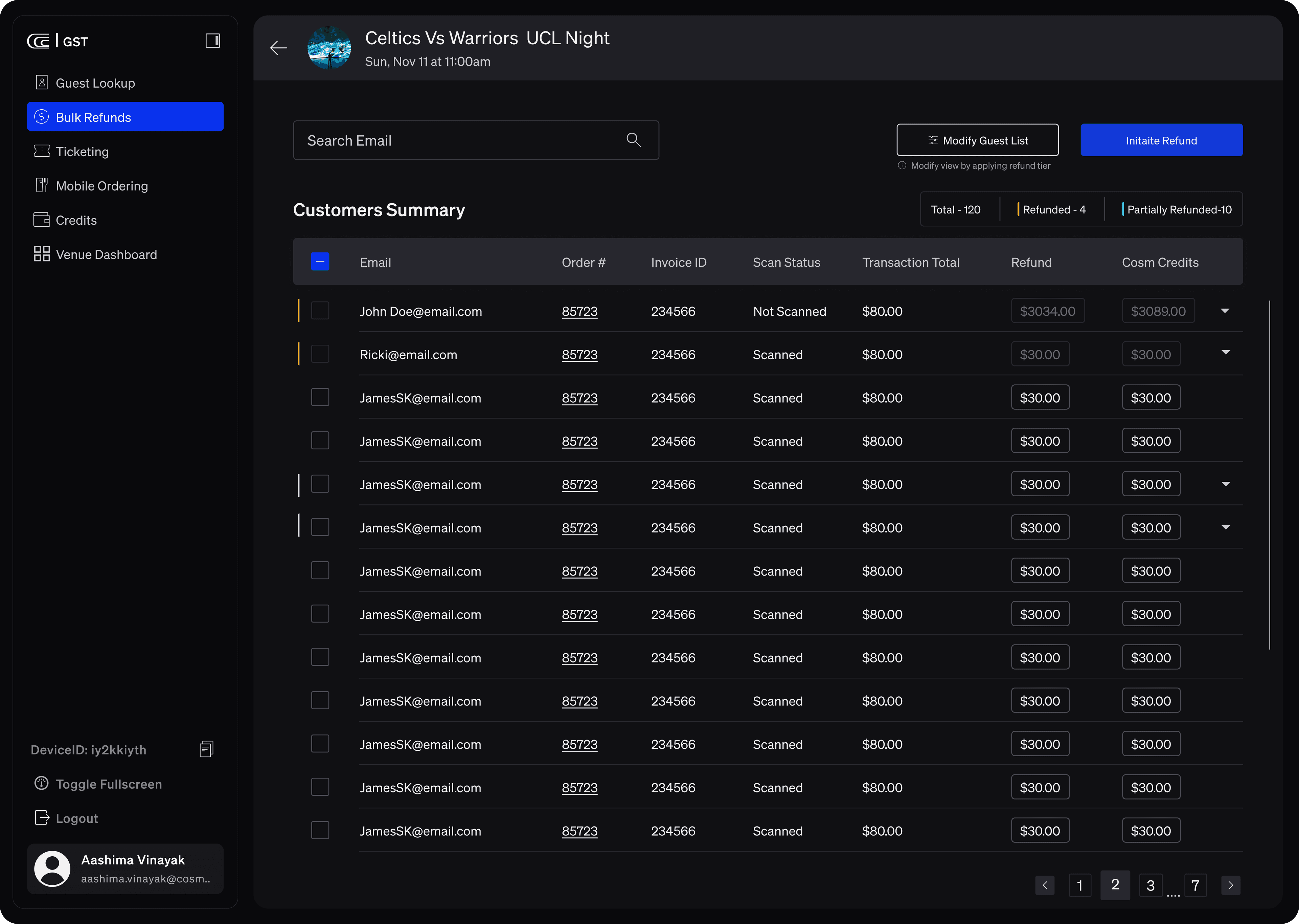
Refunds work at two scales on one model. A single order gets a decision surface with an explicit reason, a stated approval threshold and an attributed history; a whole event gets a bulk list where refund and Cosm Credit amounts stay editable per guest before anything commits.
Why it holds
Scan status and transaction total sit in the same row as the amount being refunded, so the operator judges each case without leaving the list — and the next person sees what was already done, and by whom.
The Bulk Refunds module: a customers summary table listing email, order number, invoice ID, scan status and transaction total, with editable refund and Cosm Credits amounts per row, selection checkboxes, and counts for total, refunded and partially refunded guests.

03

Ticketing

Operational need
Issue, exchange and reprint against live inventory during an event.
Key decision
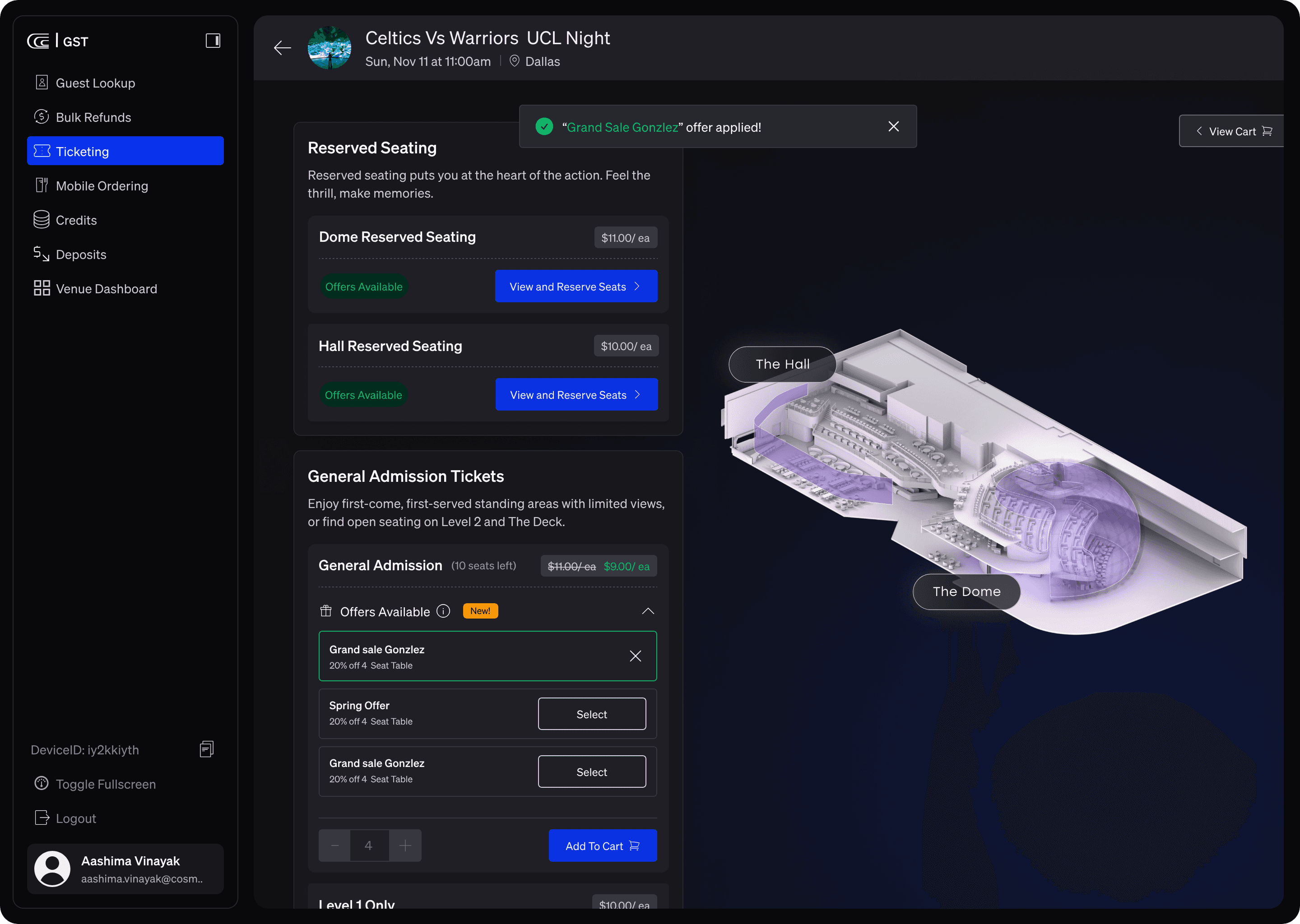
Ticket types, offers and operational holds share one surface, so availability and its reasons are read together rather than reconciled between screens.
Why it holds
Reusable ticketing interaction patterns meant the same behaviours carried across the product instead of being relearned per module.
An offer being applied in Ticketing: a confirmation banner reads that the offer was applied, the discounted price replaces the original, and the remaining offers stay listed for comparison.

04

Non-Ticket Items

Operational need
Not everything sold at a venue is a ticket, and finance still has to reconcile it.
Key decision
A custom line item — SKU name, quantity, price, guest email, internal notes — with its own confirmation email, history and separate export, rather than forcing non-ticket revenue through the ticket model.
Why it holds
Finance and reporting stay aligned without operators keeping a parallel spreadsheet.

No capture available

Non-Ticket Items appears in the product’s module rail alongside Mobile Ordering, Credits and Deposits. No screen capture of it exists in this repository, so none is shown rather than substituted.

05

Venue Dashboard

Operational need
Operations needs the state of the room, not a list of rows.
Key decision
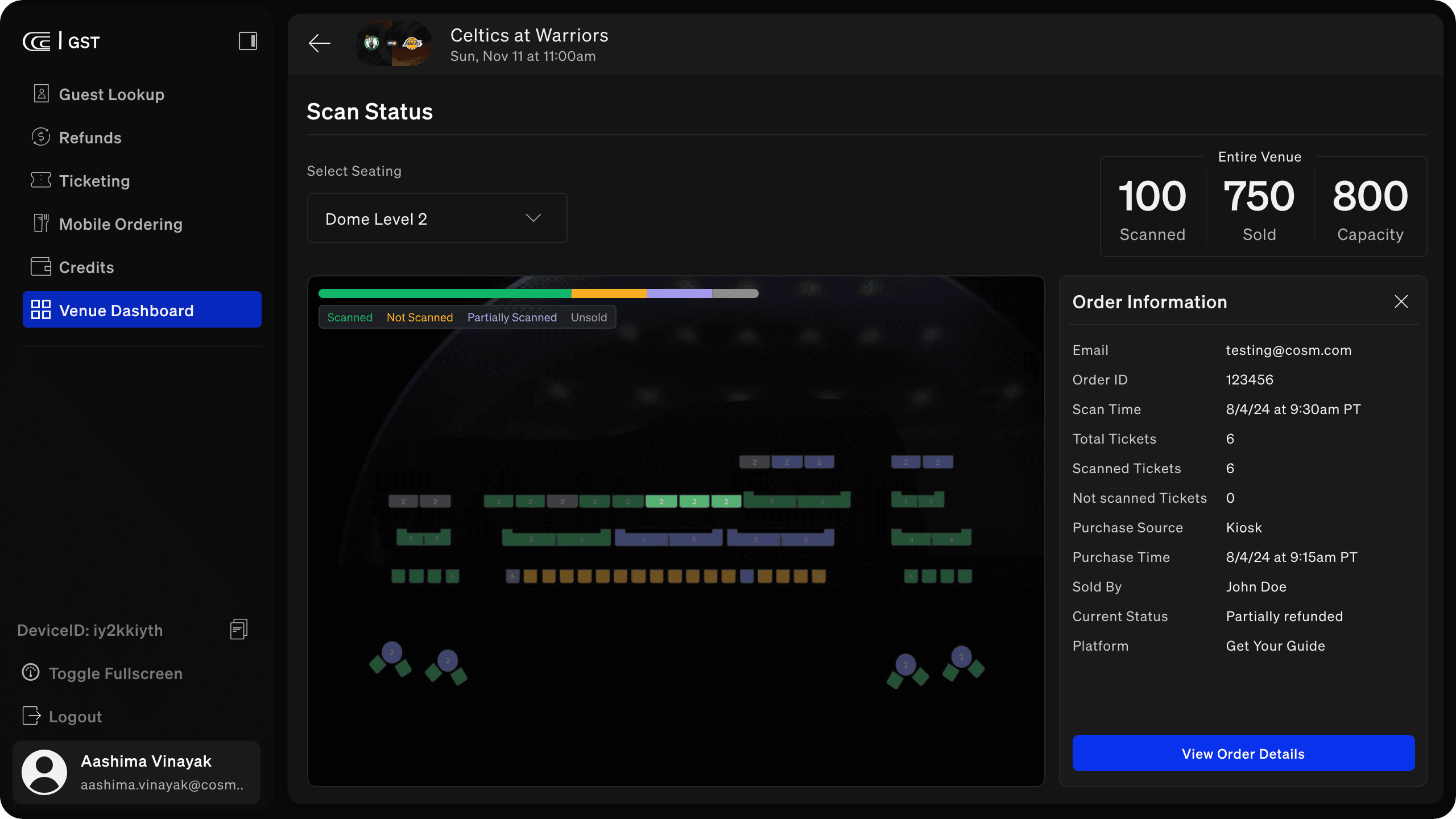
Scan state is carried by colour across the seat map with totals held above it, and any order opens in a panel beside the map rather than replacing it.
Why it holds
One view serves the supervisor watching the venue and the operator solving a single seat.
The Venue Dashboard showing live scan status for a venue level, with scanned, sold and capacity totals, and an order information panel giving scan time, purchase source, platform and current refund status.

05

The trade-offs
behind the system

Four decisions, each with something given up for it. In a tool used during a live event, the cost of a decision matters as much as its intent.

  1. 01

    Guided, not cluttered

    Constraint
    One workspace had to absorb the work of several separate tools without becoming those tools stacked in a sidebar.
    Decision
    A fixed module rail with a single active context, and density placed only where an operator is comparing values — inventory, totals, refund history.
    Trade-off
    Fewer things are visible at once than a power user might want. The cost is paid deliberately: the next action stays findable when the room is busy.
  2. 02

    Trust through feedback

    Constraint
    Refunds, releases and reissues are irreversible in the guest's eyes the moment they are told.
    Decision
    Every state-changing action states its reason, its approval condition and its consequence before it commits, and writes an attributed record afterwards.
    Trade-off
    It adds a step to the fastest possible path. In exchange, an operator can promise something and be right.
  3. 03

    Resilient by design

    Constraint
    Partial states are normal here: partially scanned orders, partial refunds, pending and accepted tickets in the same order.
    Decision
    Partial is a first-class state everywhere it can occur, rather than an error case bolted onto a binary model.
    Trade-off
    More states to design and test. The alternative is an interface that lies about the most common real situation.
  4. 04

    Built for real pressure

    Constraint
    The work happens during a live event, often standing, mid-conversation, with a queue.
    Decision
    Shared interaction patterns across modules so competence transfers, and a reduced training burden for staff who may work occasional events.
    Trade-off
    Consistency sometimes beat the locally optimal layout for a single module. Across a shift, the consistency wins.

Designed against

  • Multiple legacy integrations
  • Real-time inventory and pricing
  • Strict compliance and audit needs
  • High-stakes, time-sensitive use
  • Multiple roles, different permissions

06 — Architecture

One platform,
many systems

Three roles enter through one workspace. The platform holds the domains they share, and talks outward to the systems a venue already runs on.

Channels & roles

  • Box Office
  • Customer Support
  • Venue Operations

Guest Services Platform

  • Identity & Orders
  • Tickets & Inventory
  • Payments & Refunds
  • Events & Capacity
  • Knowledge & Policies
  • Audit & Compliance

Integrations

  • Distribution platformse.g. Get Your Guide
  • Kiosk & point of salepurchase source
  • Paymentscard & external payment
  • Scan & access controllive scan state
  • Email confirmationsguest receipts
  • Print & receiptsticket printing

Integrations shown are those named inside the product itself. The list is not exhaustive.

07

Outcomes

These are operational outcomes, not measured statistics. No adoption, revenue, resolution-time or training figures are claimed, because none are verified in this project’s record.

  • Fewer context switches

    Resolution happens inside one record instead of across separate tools holding fragments of the same order.

  • A shared operational view

    Box Office, Customer Support and Venue Operations read the same guest history, refund record and event state.

  • More consistent workflows

    The same issue is resolved the same way regardless of who picks it up or which venue they are working.

  • Clearer finance alignment

    Non-ticket revenue carries its own history and export, so reporting does not depend on a parallel spreadsheet.

  • Reduced training burden

    Reusable ticketing interaction patterns mean competence in one module transfers to the next.

  • A reusable foundation

    The pattern set is the part that carries forward into future venue operations work.

08

What I would
carry forward

  • Operational empathy means understanding the room

    The constraints that mattered most were not on the screen. A queue, a live event and a guest listening to one side of the conversation shaped more decisions than any interface pattern did.

  • Scalable systems need shared patterns and clear ownership

    Deciding once how a ticketing interaction behaves — and holding that line across modules — did more for consistency than any component library could on its own.

  • Clarity and recovery beat novelty

    In a tool used under pressure, the valuable work was making partial states legible and mistakes recoverable. Nothing about that is visually impressive, and it is the part operators rely on.

  • Good decisions survive unpredictable conditions

    The decisions I would keep are the ones that still held when the event ran late, the integration lagged or the guest had already been given a different answer.